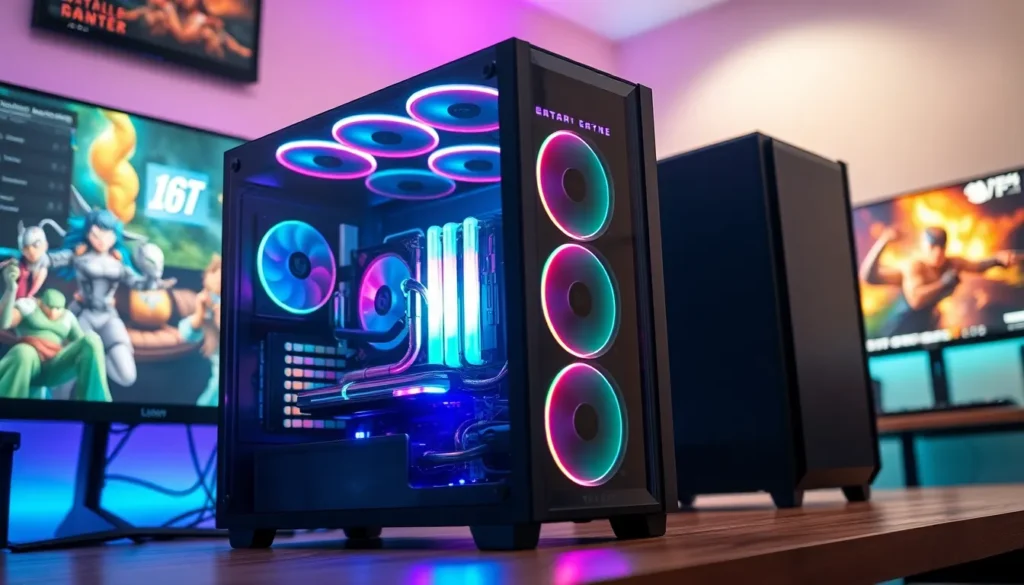
When it comes to building the ultimate gaming rig or powerhouse workstation, one thing is certain: keeping cool is key. Nobody wants their precious machine to overheat like a summer day in the Sahara. Enter the world of PC cooling solutions, where innovation meets necessity, and your computer can finally breathe easy.
Table of Contents
ToggleOverview of PC Cooling Solutions
PC cooling solutions play a vital role in maintaining optimal performance and longevity. Multiple types exist, including air cooling, liquid cooling, and phase change cooling. Air cooling relies on fans and heatsinks to dissipate heat efficiently. Heatsinks, made from materials like aluminum or copper, absorb heat from components and disperse it into the air with the help of fans.
Liquid cooling, on the other hand, uses a closed-loop system to transport heat away from critical components. This method involves pumps, radiators, and water blocks, effectively reducing temperatures even under heavy workloads. Many enthusiasts prefer liquid cooling due to its aesthetic appeal and quieter operation compared to air cooling.
Custom water cooling systems offer the most efficient heat management, featuring tailored solutions for individual setups. These systems allow for greater control over cooling performance and aesthetics but require more maintenance and expertise. Evaluating performance against the effort of installation is essential for users considering this option.
Phase change cooling represents another advanced method. It operates similarly to refrigeration, using refrigerants to absorb heat from components. Although highly effective, its complexity and cost may not suit every user’s budget or needs.
Each solution comes with distinct advantages and drawbacks. Cost, ease of installation, and cooling efficiency remain critical factors when choosing a cooling system. For gamers and workstation users, investing in high-quality cooling solutions often proves necessary to achieve maximum performance and system stability.
Types of Cooling Solutions
Effective PC cooling solutions come in various forms, each offering unique benefits and drawbacks. Users must consider factors such as efficiency, cost, and ease of installation when selecting a cooling method. Below are some common types of cooling solutions.
Air Cooling
Air cooling relies primarily on fans and heatsinks to manage temperatures. Heatsinks disperse heat from processors and graphics cards, while fans circulate air throughout the case. This method works well for most builds due to its affordability and straightforward installation. Many cooling fans deliver impressive airflow and noise reduction features, making them popular choices. Enthusiasts often opt for high-performance fans, which enhance overall cooling capacity while maintaining balance with other components.
Liquid Cooling
Liquid cooling offers advanced temperature management through a closed-loop system. This setup includes pumps, radiators, and water blocks to dissipate heat more effectively than air cooling. With this method, liquid absorbs heat from components before flowing to the radiator, where it cools down. Many users find liquid cooling quieter compared to air cooling, which reduces noise from fans. Custom liquid cooling builds allow for aesthetic flexibility, providing a unique look while improving performance. Maintenance is essential, as fluid replacement and system checks ensure optimal function.
Phase Change Cooling
Phase change cooling mimics refrigeration principles to achieve impressive cooling capabilities. This system uses a compressor to circulate refrigerant, transitioning liquid into gas to absorb heat. While extremely effective, the complexity and cost associated with phase change systems deter many users. Generating lower temperatures than air and liquid cooling, this method benefits enthusiasts focused on extreme overclocking. Users must carefully consider system compatibility and installation challenges, as specialized knowledge is often required for setup and maintenance.
Passive Cooling
Passive cooling operates without fans or pumps, relying entirely on natural convection and radiation to dissipate heat. Heat sinks made of high-conductivity materials absorb and disperse heat from components, such as CPUs and GPUs. This solution suits low-power systems or builds requiring silent operation. While passive cooling doesn’t provide the same efficiency as active solutions, its simplicity makes it appealing for specific applications. Users appreciate the reduction in moving parts, leading to a longer lifespan for components and minimal maintenance needs.
Key Components of Cooling Solutions
Effective cooling solutions rely on several key components that work together to maintain optimal operating temperatures for PCs.
Heat Sinks
Heat sinks play a critical role in dissipating heat generated by CPUs and GPUs. Typically constructed from aluminum or copper, they aid in transferring heat away from crucial components. Fins and other surface configurations enhance airflow, allowing for efficient heat dissipation. Most users find that selecting a heat sink with a larger surface area improves cooling performance. Efficiency becomes apparent in tightly packed computer enclosures where heat buildup is a concern.
Fans
Fans serve as the primary method for moving air within a computer case. Various sizes and configurations exist, including case fans and CPU fans. Most designs feature adjustable speeds to balance performance and noise levels. Effective airflow direction impacts cooling efficiency, so users often install fans in specific arrangements to optimize performance. Noise levels also factor into fan selection, making quieter models desirable for noise-sensitive environments.
Radiators
Radiators are integral to liquid cooling systems, facilitating heat transfer from coolant to the surrounding air. Radiators come in different sizes and thicknesses to accommodate various build requirements. Typically, they contain multiple channels for coolant circulation, allowing hot liquid to release heat effectively. Higher-performing radiators incorporate more surface area, significantly enhancing cooling capability. Users targeting extreme performance may opt for larger radiators to optimize temperatures.
Pumps
Pumps ensure coolant circulates properly within liquid cooling systems. The design and flow rate of pumps directly affect overall cooling efficiency. Most setups feature either a centrifugal or positive displacement pump. Stronger pumps perform better under load, maintaining consistent coolant flow through the system. Selecting a reliable pump can prevent overheating, especially in high-performance setups demanding continuous cooling.
Factors to Consider When Choosing a Cooling Solution
Choosing an appropriate cooling solution involves several important factors that impact overall performance and user experience.
Performance
Performance stands out as a primary consideration. Effective cooling solutions maintain optimal temperatures, preventing thermal throttling during intense gaming or heavy workloads. Air coolers provide sufficient cooling for most setups, while liquid cooling offers enhanced performance by reducing CPU and GPU temperatures more effectively. High-performance setups benefit considerably from robust cooling solutions that can handle increased thermal output without compromising stability. Monitoring performance metrics helps in selecting the best cooling method tailored to specific needs.
Noise Levels
Noise levels play a significant role in user comfort. While air coolers can produce noticeable noise, advancements in fan technology have lowered decibel levels significantly. Liquid cooling systems often operate more quietly, especially with larger radiators and slower fans. Users prioritizing silence may prefer components designed for low noise output. Evaluating the noise levels of cooling solutions can help avoid distractions, creating a more enjoyable computing experience.
Compatibility
Compatibility with existing hardware is essential. Not all cooling solutions fit every case or motherboard. Selecting components that align with system specifications ensures proper installation and functionality. Users should check dimensions, socket types, and system layout before purchasing. Ensuring compatibility can prevent future headaches during installation and maximize cooling efficiency.
Price
Price affects budget considerations and overall decision-making. While air coolers generally remain more affordable, liquid cooling solutions may come with higher initial costs due to their complexity and additional components. Assessing long-term value against upfront investment helps users make informed choices. Weighing performance gains against price ensures an optimal balance that meets individual needs without overspending.
Choosing the right PC cooling solution is essential for anyone looking to enhance their system’s performance and longevity. Each option presents unique benefits and challenges that cater to different needs and budgets. By carefully considering factors like cooling efficiency noise levels and compatibility users can make informed decisions that align with their specific requirements. Investing in an effective cooling solution not only safeguards hardware from overheating but also contributes to a smoother and more enjoyable computing experience. Ultimately the right choice can lead to a more stable and high-performing system ready to tackle any task or gaming session.